


Speeches deliver important messages, yet, they are just not engaging enough. People hear and forget about the speech easily. However, generating a video from the speech audio changes the situation.
Thanks to the development of AI, you don’t have to go through complicated processes in order to convert a speech audio to a video. The following are the best AI speech-to-video generators in the market.
Free Take-Away Video Templates


FlexClip - Speech-to-Video Generator Without Limits
Pricing: Free to download watermarked 720P videos. Subscription price starts from $11.99 per month.
Bring your speech to life with FlexClip's AI avatar tool. Choose from a diverse library of ready-made avatars or create a personalized avatar that reflects your brand identify, then paste your script or upload an existing audio file, FlexClip will soon deliver an engaging talking avatar with seamless lip-sync and natural expressions. No need for cameras, studios, or on-screen talent.
FlexClip AI Avatar Feature Overview
What really sets FlexClip apart is its all-in-one creative experience. From generating AI-powered narration and avatar visuals, to adding animations, subtitles, music, and branded visuals. Everything happens in a single, intuitive workspace. Even if you have no experience in video editing, you can quickly craft a compelling visual story that connects with your audiences.
FlexClip AI Avatar Video Tutorial
FlexClip AI Avatar Video Tutorial
How to Convert Speech to Video Using FlexClip
To get started, click the Generate a Speech Video button to access FlexClip's AI Avatar tool. It is an online, safe video generation tool that doesn't need any complicated setups.

Once you access FlexClip's AI Avatar page, you will be greeted with a library of avatars, including UGCs, broadcasters, 3D animations. Pick the one you like most and hit the Use button.
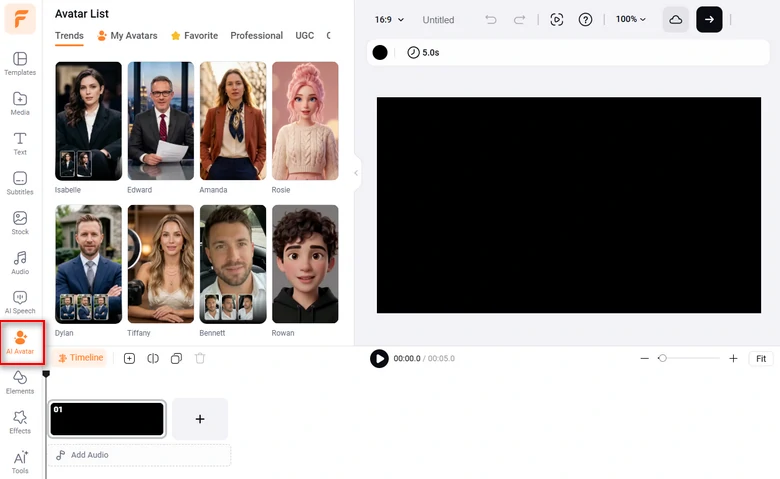
Pick a Default AI Avatar
Need a more personalized avatar instead of default ones? FlexClip gets you covered. You can upload either an image or a video clip, get an avatar in clicks.
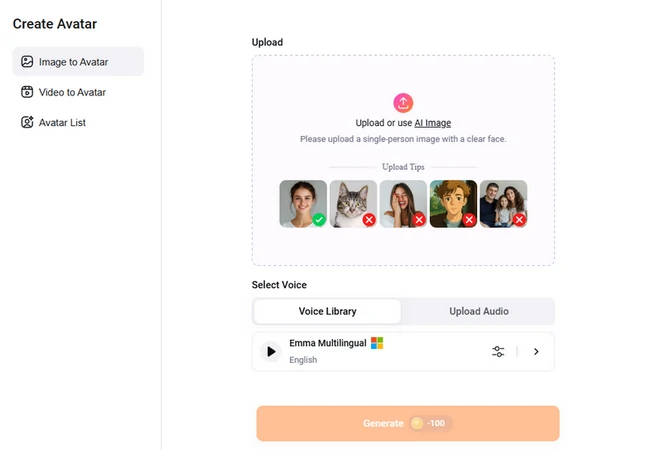
Build an AI Avatar
Drag and drop your speech audio to the upload section. The speech file should be between 3 seconds to 20 minutes. Make some basic setups like video aspect ratio, turn on/off the caption option. Hit Generate.
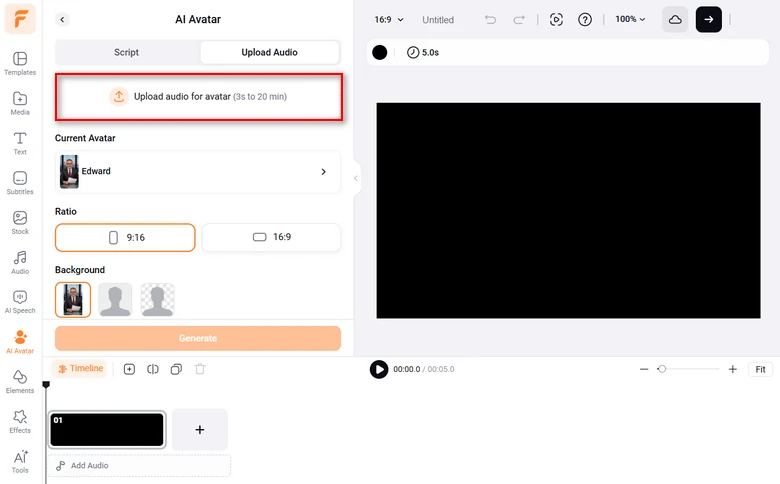
Upload a Speech File
A clip alone is not enough to go viral. FlexClip's timeline-based editor helps you trim, merge multiple clips, apply transitions, visual effects, and so on. Click on any elements of your video, all available editing tools will pop up above the preview window. Embrace the easiest way to polish your speech video.
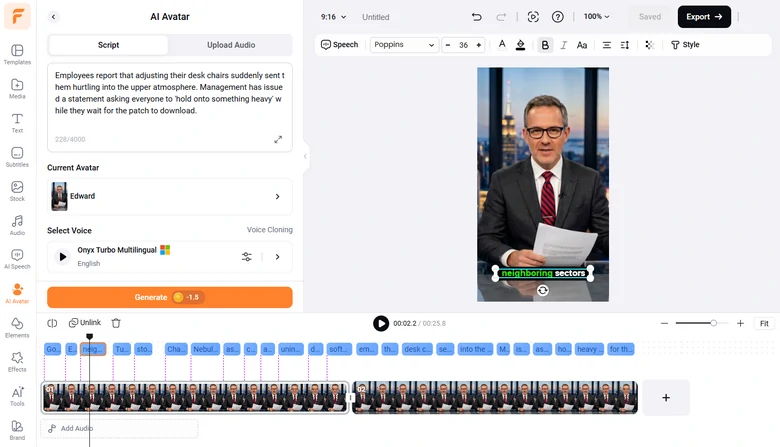
Edit Your Speech Video
Pros:
Cons:
HeyGen - Speech to Video Converter with AI Avatars
Pricing: Every account has 2 credits. After that, you need to subscribe for $24 per month.
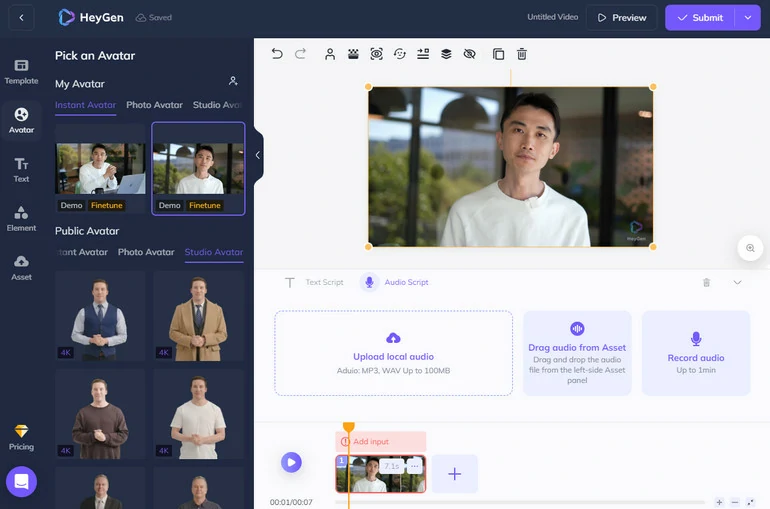
With HeyGen, you don’t need any resources, nor go through complicated editing processes to get an AI-generated speech video. With over 100 AI avatars covering different ethnicities, ages, poses and clothes, you will always find a familiar face and speak out anything for you. If you like, you can even create your own avatar.
Most AI avatar video generators will ask you to input text scripts. However, HeyGen makes it possible for you to upload local audio files directly. You don’t have to go through the troublesome transcription process. Also, we love how HeyGen avatar looks like while speaking. The lip movement and body language are so natural that you can’t even tell that it is an AI avatar instantly.
How to Generate a Speech Video at HeyGen
Add Text to Your Video
Pros:
Cons:
Veed - Speech to Video Converter and Editor
Pricing: Free to export a video with a watermark. Subscription price starts from $18 per month.
Veed changes how people create videos! Tell Veed what you want to create, you can soon get a video that is well-edited and captioned. To generate a speech video, you can tell Veed what your speech topic is about, and manually edit the video. This may take lots of work, but all its video editing tools are so easy to use.
If you insist on using the speech audio, Veed can transcribe the audio. You can then paste the audio into the Text-to-Video generator and see what will happen in the next few minutes.
How to Generate a Speech Video with Veed
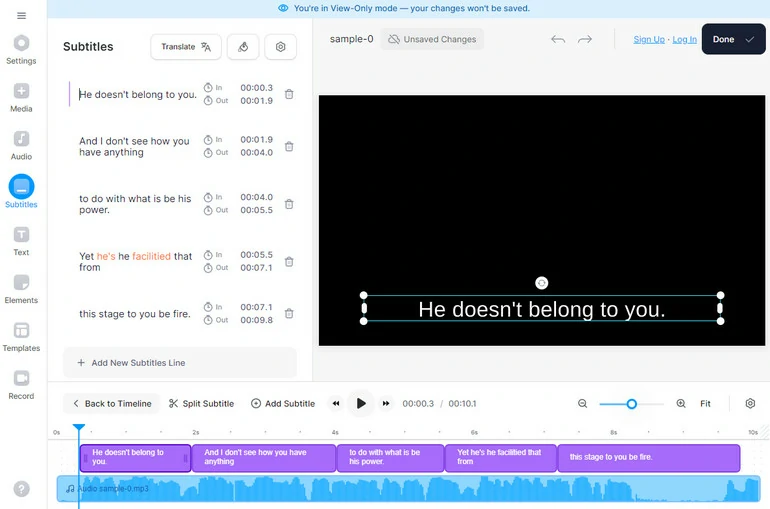
Get Transcript in Veed
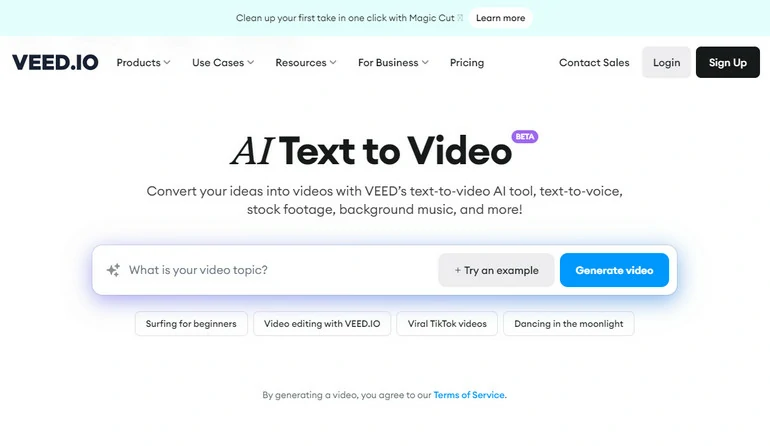
Convert Text to Video
Pros:
Cons:
The Bottom Line
The above 3 tools are different types of speech-to-video generators. FlexClip transcribes your speech audio and then generates a video automatically. HeyGen provides lots of AI avatars to speak out anything for you. Veed’s text-to-video tool is still in beta version, but it is worth trying.
In terms of accuracy, relevancy, and price, We recommend you FlexClip again. It pulls up videos with resources in high accuracy. Moreover, it is the cheapest among all listed tools. Start using it now!




FlexClip AI Video Maker
Reach professional-quality videos faster with easy editing tools, templates, and smart AI.
Start Now for Free
Hot & Trending
-

Best Ways to Find Music in YouTube Videos
-

Instagram Story Video Quality Bad After Upload? Fix It!
-

How to Repost Video on TikTok & How to Remove TikTok Repost
-

Improve Video Quality Online: 3 AI Video Quality Enhancers You Can't Miss
-

4K Convert to HD 1080p without Watermark: Best 4k Video Converters
-

Best 8 Free Video Editors - No Download Required
-

Top 13 Birthday Video Makers with Music and Effects Free
-

How to Search Filters on TikTok & Use a Filter You See - TikTok Filter Guide




